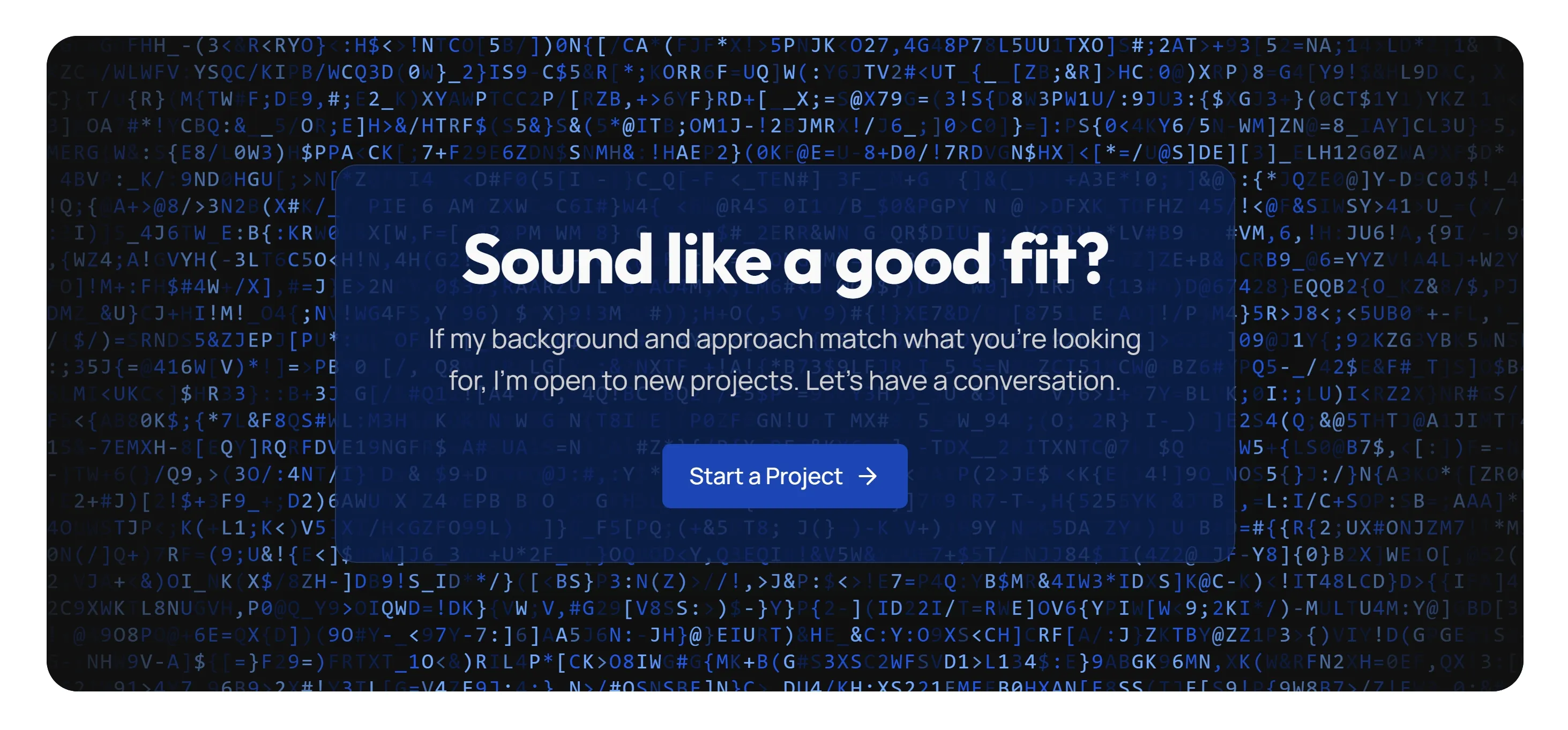
This is the pattern I ship on hansmartens.dev — a field of brand-coloured letters and symbols flickering behind every desktop CTA, with a glass card on top to keep the copy readable. This post is a guide to dropping it into any Astro 7 site, with the full component, the wrapper I use, and the small details that make it production-ready.
Credit where it’s due
The base canvas component is adapted from Gothsec’s Astro portfolio — a great repo to dig through if you like canvas tricks. What follows is my version: brand-token aware, mobile-safe, reduced-motion respectful, and packaged behind a single Astro component you can drop into a section.
What you’re building
A canvas that fills its parent, lays out a grid of one-character cells (10×20px each), and swaps out roughly 5% of those cells every ~33ms. Each swap picks a new random character and a new target colour from a small palette; the colour fades smoothly to the target over the next few frames. There are no shaders, no filters, just fillText calls.
It looks busy in motion and surprisingly calm at rest, which is exactly why it works as a backdrop for a CTA — visual interest without a focal point that competes with the headline.
Step 1 — Make sure React is installed
Astro 7 uses islands, and the canvas component is React. If you haven’t added the integration yet:
npx astro add reactThat installs @astrojs/react and updates astro.config.mjs. If you’re already using React anywhere on the site, skip this.
Step 2 — Drop in the LetterGlitch component
Save this as src/components/effects/LetterGlitch.tsx. It’s the canvas effect with the brand-token resolver and the reduced-motion guard built in.
import { useRef, useEffect } from 'react';

interface LetterGlitchProps {
  glitchColors?: string[];
  glitchSpeed?: number;
  centerVignette?: boolean;
  outerVignette?: boolean;
  smooth?: boolean;
  /**
   * When true (default), at mount the component reads --brand-300, --brand-600,
   * and --brand-900 from :root and uses those as the glitch palette so the
   * effect tracks the active theme. Falls back to `glitchColors` if the
   * tokens can't be resolved.
   */
  useBrandTokens?: boolean;
}

const FALLBACK_COLORS = ['#5e4491', '#A476FF', '#241a38'];
const BRAND_VARS = ['--brand-300', '--brand-600', '--brand-900'];

const LetterGlitch = ({
  glitchColors = FALLBACK_COLORS,
  glitchSpeed = 33,
  centerVignette = false,
  outerVignette = false,
  smooth = true,
  useBrandTokens = true,
}: LetterGlitchProps) => {
  const canvasRef = useRef<HTMLCanvasElement | null>(null);
  const animationRef = useRef<number | null>(null);
  const letters = useRef<
    {
      char: string;
      color: string;
      targetColor: string;
      colorProgress: number;
    }[]
  >([]);
  const grid = useRef({ columns: 0, rows: 0 });
  const context = useRef<CanvasRenderingContext2D | null>(null);
  const lastGlitchTime = useRef(Date.now());
  const activeColors = useRef<string[]>(glitchColors);

  const fontSize = 16;
  const charWidth = 10;
  const charHeight = 20;

  const lettersAndSymbols = [
    'A', 'B', 'C', 'D', 'E', 'F', 'G', 'H', 'I', 'J', 'K', 'L', 'M',
    'N', 'O', 'P', 'Q', 'R', 'S', 'T', 'U', 'V', 'W', 'X', 'Y', 'Z',
    '!', '@', '#', '$', '&', '*', '(', ')', '-', '_', '+', '=', '/',
    '[', ']', '{', '}', ';', ':', '<', '>', ',',
    '0', '1', '2', '3', '4', '5', '6', '7', '8', '9',
  ];

  const getRandomChar = () =>
    lettersAndSymbols[Math.floor(Math.random() * lettersAndSymbols.length)];

  const getRandomColor = () => {
    const list = activeColors.current;
    return list[Math.floor(Math.random() * list.length)];
  };

  const parseColor = (color: string) => {
    const sixHex = /^#?([a-f\d]{2})([a-f\d]{2})([a-f\d]{2})$/i.exec(color);
    if (sixHex) {
      return {
        r: parseInt(sixHex[1], 16),
        g: parseInt(sixHex[2], 16),
        b: parseInt(sixHex[3], 16),
      };
    }
    const threeHex = /^#?([a-f\d])([a-f\d])([a-f\d])$/i.exec(color);
    if (threeHex) {
      return {
        r: parseInt(threeHex[1] + threeHex[1], 16),
        g: parseInt(threeHex[2] + threeHex[2], 16),
        b: parseInt(threeHex[3] + threeHex[3], 16),
      };
    }
    const rgb = /^rgba?\(\s*(\d+)\s*,\s*(\d+)\s*,\s*(\d+)/.exec(color);
    if (rgb) {
      return {
        r: parseInt(rgb[1], 10),
        g: parseInt(rgb[2], 10),
        b: parseInt(rgb[3], 10),
      };
    }
    return null;
  };

  const interpolateColor = (
    start: { r: number; g: number; b: number },
    end: { r: number; g: number; b: number },
    factor: number,
  ) => {
    const r = Math.round(start.r + (end.r - start.r) * factor);
    const g = Math.round(start.g + (end.g - start.g) * factor);
    const b = Math.round(start.b + (end.b - start.b) * factor);
    return `rgb(${r}, ${g}, ${b})`;
  };

  const calculateGrid = (width: number, height: number) => ({
    columns: Math.ceil(width / charWidth),
    rows: Math.ceil(height / charHeight),
  });

  const initializeLetters = (columns: number, rows: number) => {
    grid.current = { columns, rows };
    const totalLetters = columns * rows;
    letters.current = Array.from({ length: totalLetters }, () => ({
      char: getRandomChar(),
      color: getRandomColor(),
      targetColor: getRandomColor(),
      colorProgress: 1,
    }));
  };

  const drawLetters = () => {
    if (!context.current || letters.current.length === 0) return;
    const ctx = context.current;
    const { width, height } = canvasRef.current!.getBoundingClientRect();
    ctx.clearRect(0, 0, width, height);
    ctx.font = `${fontSize}px monospace`;
    ctx.textBaseline = 'top';

    letters.current.forEach((letter, index) => {
      const x = (index % grid.current.columns) * charWidth;
      const y = Math.floor(index / grid.current.columns) * charHeight;
      ctx.fillStyle = letter.color;
      ctx.fillText(letter.char, x, y);
    });
  };

  const resizeCanvas = () => {
    const canvas = canvasRef.current;
    if (!canvas) return;
    const parent = canvas.parentElement;
    if (!parent) return;

    const dpr = window.devicePixelRatio || 1;
    const rect = parent.getBoundingClientRect();

    canvas.width = rect.width * dpr;
    canvas.height = rect.height * dpr;
    canvas.style.width = `${rect.width}px`;
    canvas.style.height = `${rect.height}px`;

    if (context.current) {
      context.current.setTransform(dpr, 0, 0, dpr, 0, 0);
    }

    const { columns, rows } = calculateGrid(rect.width, rect.height);
    initializeLetters(columns, rows);
    drawLetters();
  };

  const updateLetters = () => {
    if (!letters.current || letters.current.length === 0) return;

    const updateCount = Math.max(1, Math.floor(letters.current.length * 0.05));

    for (let i = 0; i < updateCount; i++) {
      const index = Math.floor(Math.random() * letters.current.length);
      if (!letters.current[index]) continue;

      letters.current[index].char = getRandomChar();
      letters.current[index].targetColor = getRandomColor();

      if (!smooth) {
        letters.current[index].color = letters.current[index].targetColor;
        letters.current[index].colorProgress = 1;
      } else {
        letters.current[index].colorProgress = 0;
      }
    }
  };

  const handleSmoothTransitions = () => {
    let needsRedraw = false;
    letters.current.forEach((letter) => {
      if (letter.colorProgress < 1) {
        letter.colorProgress += 0.05;
        if (letter.colorProgress > 1) letter.colorProgress = 1;

        const startRgb = parseColor(letter.color);
        const endRgb = parseColor(letter.targetColor);
        if (startRgb && endRgb) {
          letter.color = interpolateColor(startRgb, endRgb, letter.colorProgress);
          needsRedraw = true;
        }
      }
    });

    if (needsRedraw) {
      drawLetters();
    }
  };

  const animate = () => {
    const now = Date.now();
    if (now - lastGlitchTime.current >= glitchSpeed) {
      updateLetters();
      drawLetters();
      lastGlitchTime.current = now;
    }
    if (smooth) {
      handleSmoothTransitions();
    }
    animationRef.current = requestAnimationFrame(animate);
  };

  // Resolves brand tokens (e.g. --brand-500: oklch(...)) to plain rgb(r,g,b)
  // strings via a 1×1 canvas. Works for any CSS colour the browser can paint.
  const resolveBrandColors = (): string[] => {
    if (typeof document === 'undefined') return [];
    const tmp = document.createElement('canvas');
    tmp.width = 1;
    tmp.height = 1;
    const tmpCtx = tmp.getContext('2d');
    if (!tmpCtx) return [];
    const root = getComputedStyle(document.documentElement);
    const resolved: string[] = [];
    for (const name of BRAND_VARS) {
      const raw = root.getPropertyValue(name).trim();
      if (!raw) continue;
      tmpCtx.clearRect(0, 0, 1, 1);
      tmpCtx.fillStyle = '#000';
      tmpCtx.fillStyle = raw;
      tmpCtx.fillRect(0, 0, 1, 1);
      const [r, g, b] = tmpCtx.getImageData(0, 0, 1, 1).data;
      resolved.push(`rgb(${r}, ${g}, ${b})`);
    }
    return resolved;
  };

  useEffect(() => {
    const canvas = canvasRef.current;
    if (!canvas) return;

    context.current = canvas.getContext('2d');

    if (useBrandTokens) {
      const brand = resolveBrandColors();
      if (brand.length > 0) {
        activeColors.current = brand;
      }
    }

    resizeCanvas();

    const prefersReducedMotion =
      typeof window !== 'undefined' &&
      window.matchMedia('(prefers-reduced-motion: reduce)').matches;

    if (!prefersReducedMotion) {
      animate();
    }

    let resizeTimeout: ReturnType<typeof setTimeout>;
    const handleResize = () => {
      clearTimeout(resizeTimeout);
      resizeTimeout = setTimeout(() => {
        if (animationRef.current !== null) {
          cancelAnimationFrame(animationRef.current);
        }
        resizeCanvas();
        if (!prefersReducedMotion) {
          animate();
        }
      }, 100);
    };

    window.addEventListener('resize', handleResize);

    return () => {
      if (animationRef.current !== null) {
        cancelAnimationFrame(animationRef.current);
      }
      window.removeEventListener('resize', handleResize);
    };
    // eslint-disable-next-line react-hooks/exhaustive-deps
  }, [glitchSpeed, smooth, useBrandTokens]);

  return (
    <div className="relative w-full h-full bg-[#101010] overflow-hidden">
      <canvas ref={canvasRef} className="block w-full h-full" />
      {outerVignette && (
        <div className="absolute top-0 left-0 w-full h-full pointer-events-none bg-[radial-gradient(circle,_rgba(16,16,16,0)_60%,_rgba(16,16,16,1)_100%)]"></div>
      )}
      {centerVignette && (
        <div className="absolute top-0 left-0 w-full h-full pointer-events-none bg-[radial-gradient(circle,_rgba(0,0,0,0.8)_0%,_rgba(0,0,0,0)_60%)]"></div>
      )}
    </div>
  );
};

export default LetterGlitch;
Three things in there are worth pausing on.
The brand-token resolver. Canvas 2D’s fillStyle accepts any CSS colour — including OKLCH — but the smooth-transition step needs { r, g, b } triples to lerp between. The trick is a 1×1 helper canvas: set its fillStyle to the raw oklch(...) string from your CSS variable, paint a single pixel, read it back with getImageData. The browser handles the OKLCH → sRGB conversion in C++ and hands you integer RGB channels. Works for any colour the browser can paint, not just OKLCH.
The reduced-motion guard. Constant glitching is exactly what prefers-reduced-motion: reduce exists to silence. The component reads the preference once on mount and skips animate() if it’s set — a single static frame of the grid still draws, so the visual still has the right colours and shape, it just doesn’t loop.
No throttling beyond requestAnimationFrame. The animation cost scales with the canvas area (more cells = more letters), which is one reason you’ll want to gate it on viewport size.
Step 3 — Wrap it in an Astro pattern component
The canvas alone isn’t enough. You also need:
- A contained band so it doesn’t go full-bleed
- An overlay glass card so headline copy stays readable
- A breakpoint gate so it only renders on desktop with a real pointer
I package all three into a single Astro file. Save this as src/components/patterns/LetterGlitchBand.astro:
---
import LetterGlitch from '@/components/effects/LetterGlitch';
---

<div class="hidden glitch:block mx-auto max-w-6xl px-6">
  <div class="invert-section relative overflow-hidden rounded-3xl border border-white/10">
    <div class="absolute inset-0" aria-hidden="true">
      <LetterGlitch client:visible outerVignette />
    </div>
    <div class="relative z-10 px-6 py-16 sm:py-24" data-reveal>
      <div class="mx-auto max-w-2xl rounded-2xl border border-white/10 bg-brand-900/85 px-6 py-10 sm:px-10 text-center shadow-xl backdrop-blur-md">
        <slot />
      </div>
    </div>
  </div>
</div>
The glitch: prefix is a custom Tailwind v4 variant I define once in src/styles/global.css:
@custom-variant glitch (@media (min-width: 1024px) and (pointer: fine));That gives you glitch:block and glitch:hidden utilities that turn the canvas on only at desktop widths with a fine pointer. Touch laptops with a 1024px viewport stay on the lighter mobile fallback — which they should, because the canvas is busy and the visual is built for a mouse-shaped reading distance.
Step 4 — Use it in a page
In any .astro page, render two variants of the CTA side by side: a quiet flat version below the glitch breakpoint, the band above it. The custom variant flips them.
---
import LetterGlitchBand from '@/components/patterns/LetterGlitchBand.astro';
import Button from '@/components/ui/form/Button/Button.astro';
---

<section class="relative z-10 py-24 bg-background-secondary border-t border-border">
  <!-- Mobile / non-pointer: flat section, no canvas -->
  <div class="glitch:hidden mx-auto max-w-2xl px-6 text-center">
    <h2 class="font-display text-4xl font-bold mb-4">Have a project in mind?</h2>
    <p class="text-lg text-foreground-muted mb-8">
      Whether it's a new build or something that needs a fresh perspective.
    </p>
    <div class="flex flex-col sm:flex-row gap-4 justify-center">
      <Button size="lg" href="/contact">Start a project</Button>
      <Button size="lg" variant="outline" href="/about">More about me</Button>
    </div>
  </div>

  <!-- Desktop with pointer: canvas band -->
  <LetterGlitchBand>
    <h2 class="font-display text-4xl font-bold mb-4">Have a project in mind?</h2>
    <p class="text-lg text-foreground-muted mb-8">
      Whether it's a new build or something that needs a fresh perspective.
    </p>
    <div class="flex flex-col sm:flex-row gap-4 justify-center">
      <Button size="lg" href="/contact" class="hero-btn-brand">Start a project</Button>
      <Button size="lg" variant="outline" href="/about">More about me</Button>
    </div>
  </LetterGlitchBand>
</section>
That’s the entire integration.
Why the mobile fallback costs nothing
Even though the canvas is hidden on mobile, the React component is still in the markup. A reasonable concern: does it hydrate and start animating in the background, eating CPU and battery for no reason?
It does not. The component is mounted with client:visible, which Astro implements as an IntersectionObserver. An element whose ancestor has display: none has no observable bounding box — the observer never reports intersection, the directive never fires, the React module never loads, the canvas is never created, the animation loop never starts.
Zero markup overrides, zero JS guards, zero kilobytes of canvas code on a phone, just because of how display: none interacts with intersection observation. It’s the kind of thing that makes Astro’s island model genuinely shine.
Why the glass card matters
The canvas is decorative; the words on top of it have to do real work. Without an overlay, the muted paragraph and the outline secondary button both lose contrast against the bright cycling letters — WCAG might still pass, but the feel doesn’t.
The card is a near-opaque tinted backdrop:
<div class="mx-auto max-w-2xl rounded-2xl border border-white/10
            bg-brand-900/85 px-6 py-10 sm:px-10 text-center
            shadow-xl backdrop-blur-md">
bg-brand-900/85 is the darkest end of the brand scale at 85% opacity. Tailwind v4 implements that with color-mix, so it tracks whatever --brand-900 is. The card shares its hue with the surrounding canvas instead of fighting it as a solid black sticker would. The thin border-white/10, the backdrop-blur-md, and the shadow-xl together give the card just enough physicality to feel earned.
That also lets you drop centerVignette from the <LetterGlitch> props — the card supersedes it. Keep outerVignette so the canvas fades into the rounded section edges instead of cutting hard.
Why I keep it desktop-only on my own site
The glitch: breakpoint isn’t a placeholder for “I haven’t optimised mobile yet.” On hansmartens.dev I’ve decided the canvas is permanently desktop-and-fine-pointer-only. Three reasons, in order of weight:
Lighthouse mobile Performance. Every new feature on this site gets weighed against its Lighthouse score before it ships, because I keep the site at 100/100/100/100 on both desktop and mobile deliberately. The mobile LetterGlitch was on the table for a while; running the canvas on a phone-sized viewport cost roughly 2 Performance points and would have broken the perfect mobile score. Two points isn’t nothing — and the visual didn’t earn them, so it stayed off.
The composition doesn’t survive narrow widths. The pattern is a contained max-w-6xl band with a glass card centred inside. On a 390px screen the band collapses to nearly the full viewport, the rounded corners crowd the headline, and the glass card has nowhere to breathe. The canvas reads as cramped instead of confident — the exact opposite of what a CTA section should feel like.
The per-frame work scales with cell count. A 10×20px cell grid that’s narrow enough to fit a phone still has to redraw on every frame, with the smooth-transition pass running an interpolation per cycling letter on top. It’s not a disaster, but it’s the kind of work I’d rather not be doing on a battery-powered device while a visitor is reading a CTA.
The mobile fallback is a flat centred CTA section — the same headline and buttons, on the page background, no canvas and no card. The rhythm of the page survives; the cost doesn’t. That same logic gates the cursor trail (desktop, fine pointer, no reduced-motion), the heavier reveal animations, and a few other effects: if the fancy version doesn’t earn its keep on a phone, the phone gets the quiet version. This is the choice I’d make again on every project.
A few things to know
Pick palette tokens that read well on a dark canvas. The component reads --brand-300, --brand-600, and --brand-900 by default. If your palette has very dark mid-tones, the letters will disappear into the #101010 background. Swap the BRAND_VARS array for lighter steps (e.g. --brand-200, --brand-400, --brand-700) and re-run.
Don’t use it without outerVignette inside a rounded container. The hard rectangle of the canvas reads as a sticker against the page; the vignette dissolves it into the corners.
Customise the character set. The lettersAndSymbols array is the easiest knob. Latin caps, digits, and symbols read as “code” — which is the vibe most developer sites are after. Substitute katakana, Greek, or runes for a different mood; just keep the count similar so the visual density stays the same.
Don’t use it on the hero. The effect is heavy enough that visitors land on it before the rest of the page can catch up, and it competes with the headline animation. CTA bands at the bottom of long pages are the natural home — the visitor has already read the page; the canvas earns its space as a closer, not an opener.
Wrap-up
Three files: a React canvas component, an Astro wrapper, a custom Tailwind variant. One import per section that wants the effect. The desktop CTA gets a piece of visual identity that nothing else on the page can match; the phone keeps its battery; the keyboard user with reduced motion sees a polite static frame instead of a strobe.
It’s the kind of detail that has no business being this cheap to ship — and on Astro 7, with islands and client:visible, it really is.